How to File a Final Tax Return for Overseas FX | From Getting the Annual Transaction Report to Filling In the Return

Profits from overseas FX are, in principle, treated as miscellaneous income under aggregate taxation. For a salaried employee who receives pay from one place, a final tax return is required once income other than salary exceeds ¥200,000 a year.
This article explains the conditions under which filing is required, the tax rates, and the flow from getting the annual transaction report to filling in the return. Deduction amounts and the like are those for the case of reporting 2026 income in 2027.
Table of Contents
- Profits from Overseas FX Are Miscellaneous Income Under Aggregate Taxation
- From What Amount Do You Need to File a Final Tax Return? Over ¥200,000 for Salaried Employees
- Effect on Dependent and Spousal Deductions
- What Is the Tax Rate on Overseas FX? Income Tax of 5 to 45%
- What to Prepare Before Filing
- How to Get an Annual Transaction Report in MT4 and MT5
- Calculating Profit and Loss, and Swaps and Commissions
- Converting USD Accounts into Yen
- How to Prepare the Final Tax Return
- Expenses and Income Deductions
- How Loss Years Are Treated
- Treatment of Bonuses and Cashback
- If You Don't File
- Checking Your Trading History at EdgeGraph FX
- FAQ
- Summary
Profits from Overseas FX Are Miscellaneous Income Under Aggregate Taxation
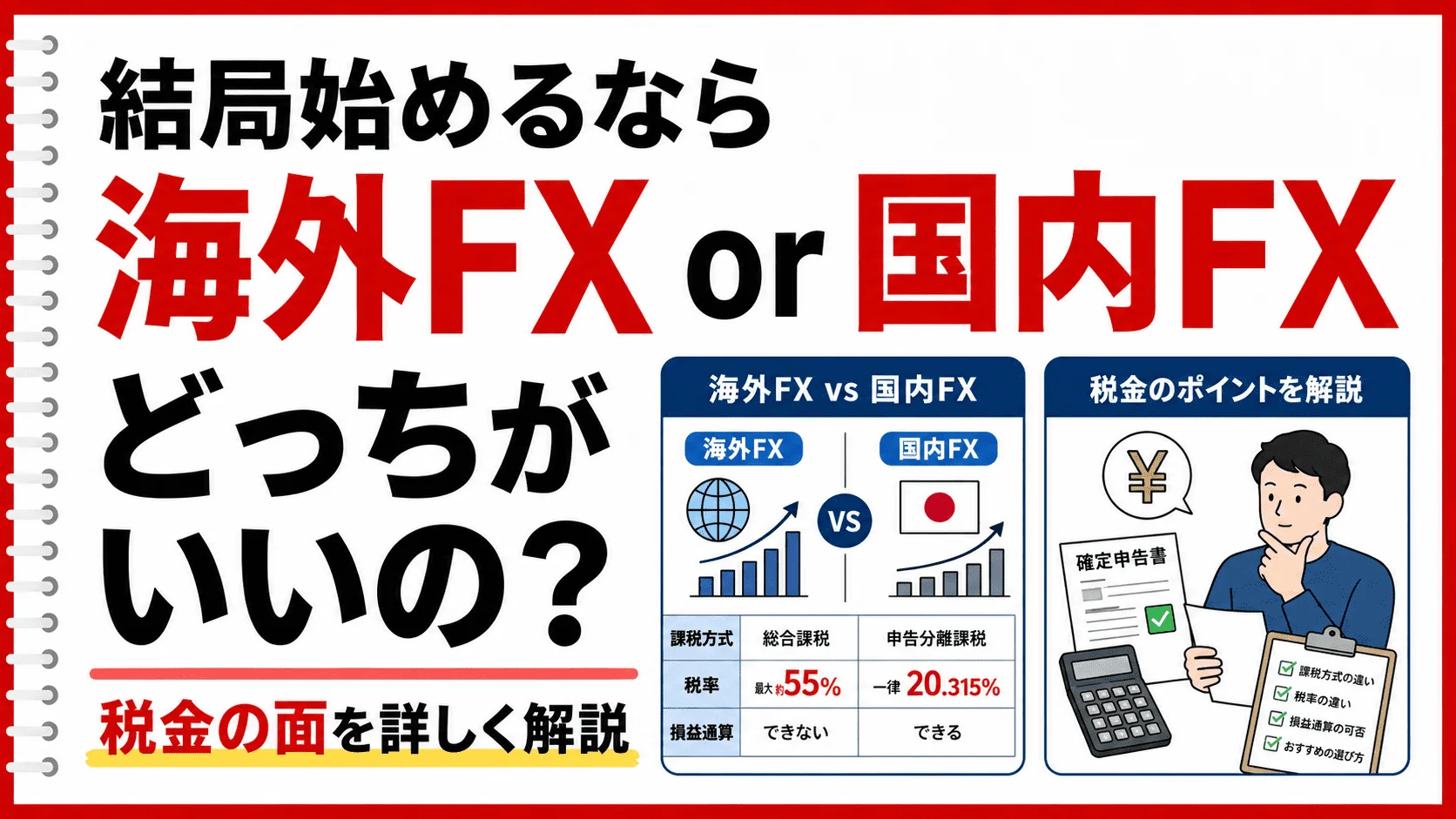
Profits from overseas FX are treated as miscellaneous income under aggregate taxation, where the tax is calculated by combining them with other income such as salary. In contrast, trading with domestic FX companies is taxed separately from other income as "miscellaneous income, etc. from futures transactions."
Differences in tax between domestic FX and overseas FX
| Point of comparison | Domestic FX | Overseas FX |
|---|---|---|
| Taxation method | separate self-assessment taxation | Aggregate taxation |
| Tax rate | Income tax, resident tax and others combined: 20.315% | Income tax 5-45% + resident tax 10% |
| Offsetting losses against profits | Can be offset within futures transaction income | Can be offset only within miscellaneous income |
| Carrying losses forward | Can be carried forward for 3 years | In principle cannot be carried forward |
With overseas FX, the tax rate rises as income increases. For that reason, depending on the amount of income, the tax burden can be heavier than with domestic FX.
From What Amount Do You Need to File a Final Tax Return? Over ¥200,000 for Salaried Employees
Whether you need to file depends on whether you receive a salary and on the amount of your non-salary income.
Conditions under which a final tax return and a resident tax return are required when you profit from overseas FX
| Who it applies to | Final income tax return | Resident tax return |
|---|---|---|
| Salaried employee with one employer and non-salary income of ¥200,000 or less | In principle not required | Required |
| Salaried employee with one employer and non-salary income over ¥200,000 | In principle required | In principle not required if you file a final tax return |
| People with no salary income | Required if income exceeds the total of income deductions and tax arises | Required if you do not file a final tax return |
Income here means FX profit minus necessary expenses. If you have other non-salary income, such as from a side job, judge using the total.
Notes for Salaried Employees
This standard applies to people who receive salary from one place and have a year-end adjustment done. The conditions differ for people who receive salary from two or more places, or whose annual salary revenue exceeds ¥20 million.
Even if you do not need to file a final income tax return, you still need to file a resident tax return separately. Be sure to file your resident tax return with the city, ward, town or village where you live.
Also, if you file a final tax return in order to claim the medical expense deduction or the donation deduction for hometown tax donations (furusato nozei), include overseas FX income of ¥200,000 or less in the return as well.
Full-Time Traders, Homemakers and Students
The same standard as for salaried employees does not apply to people with no salary income. You need to file when your total income exceeds the total of income deductions such as the basic deduction and tax arises.
For 2026, the basic deduction is ¥1,040,000 if total income is ¥4,890,000 or less. Considering a case with no deductions other than the basic deduction, filing becomes necessary from around the point where overseas FX income exceeds ¥1,040,000.
Even at an amount where an income tax return is not needed, you may still need to file a resident tax return separately.
Effect on Dependent and Spousal Deductions
If someone who is a dependent of a family member makes a profit on overseas FX, they may cease to qualify as a dependent. This is because the total income used to judge dependent and spousal deductions includes miscellaneous income from overseas FX.
For 2026, family members eligible for the dependent deduction and the spousal deduction are those whose total income is ¥620,000 or less. If a spouse's total income exceeds ¥620,000 but is ¥1,330,000 or less, they qualify for the special spousal deduction instead of the spousal deduction.
For example, if a student who is a dependent earns ¥700,000 in overseas FX income, they may no longer qualify for the parent's dependent deduction. For people aged 19 or over and under 23, there is also a special deduction for specified relatives that covers total income up to ¥1,230,000, so it is a good idea to check at the year-end adjustment at your parent's workplace.
Dependent status under health insurance is judged by standards separate from tax dependents. Be sure to check the health insurance you are enrolled in as well.
What Is the Tax Rate on Overseas FX? Income Tax of 5 to 45%
Income tax on overseas FX profits has seven brackets from 5 to 45%, depending on the amount of taxable income. A 2.1% special reconstruction income tax is added on top of income tax, and resident tax of 10% is levied separately.
Income tax rates on overseas FX profits (2026)
| Taxable income amount | Tax rate | Deduction amount |
|---|---|---|
| Under ¥1.95 million | 5% | ¥0 |
| ¥1.95 million to under ¥3.3 million | 10% | ¥97,500 |
| ¥3.3 million to under ¥6.95 million | 20% | ¥427,500 |
| ¥6.95 million to under ¥9 million | 23% | ¥636,000 |
| ¥9 million to under ¥18 million | 33% | ¥1,536,000 |
| ¥18 million to under ¥40 million | 40% | ¥2,796,000 |
| ¥40 million or more | 45% | ¥4,796,000 |
Taxable income is the amount obtained by adding salary income and overseas FX income and subtracting income deductions. Income tax is calculated by multiplying this amount by the tax rate and subtracting the deduction amount.
For example, if taxable income is ¥5,000,000, income tax is ¥5,000,000 × 20% − ¥427,500 = ¥572,500. The special reconstruction income tax and resident tax are added on top of this.
If you want to know how the tax amount compares with domestic FX at each taxable income level, check out this article!
What to Prepare Before Filing
The following documents are used in a final tax return.
- A full year of trading history that serves as the annual transaction report
- Your employer's withholding tax slip (for salaried employees)
- Certificates for claiming deductions such as life insurance premiums and medical expenses
- Receipts for costs you will claim as expenses
- Documents that let you confirm your My Number
With overseas FX, a document like an annual transaction report is not necessarily issued by the broker. In many cases, you save a full year of trading history as a report from the MT4 or MT5 you use for trading, and use it as your profit and loss record.
How to Get an Annual Transaction Report in MT4 and MT5
In MT4 and MT5, you can save a full year of trading history from the desktop trading screen.
Steps to save a full year of trading history as a report in MT4 and MT5
| Step | MT5 | MT4 |
|---|---|---|
| 1. Open the history | Open the "History" tab in the Toolbox | Open the "Account History" tab in the Terminal |
| 2. Set the period | Set the period from January 1 to December 31 | Right-click, choose "Custom period," and specify January 1 to December 31 |
| 3. Save the report | Right-click, choose a format from "Report," and save | Right-click, choose "Save as Report," and save |
Menu labels may differ slightly depending on the broker and version. Saving may not be possible in the smartphone app, so save from the desktop version.
Save Separately for Each Account If You Have Several
A report shows only the trades of the account you are logged in to. If you have traded with multiple accounts or multiple brokers, save a report for each account and add up the profit and loss.
Calculating Profit and Loss, and Swaps and Commissions
The overseas FX income you report is the total profit and loss of trades settled during the year minus necessary expenses. Unrealized gains and losses on positions still open at year-end are not included in that year's income.
A position held across the new year may appear in the reports for both the year it was opened and the year it was settled. When adding up, check the settlement date in the report and count only the trades settled in that year.
In addition to profit and loss for each trade, the report shows swap points and trading commissions. It is common to count swap points as income as well.
For trading commissions, you either deduct them as an expense or use the total profit and loss after commissions are subtracted. Be careful: if you deduct them both ways, the commissions are counted twice.
Converting USD Accounts into Yen
If the account currency is a foreign currency such as US dollars, convert profit and loss into yen before reporting. For a yen-denominated account, you can use the profit and loss in the report as it is.
As a rule, profit and loss recorded in a foreign currency is converted into yen at the TTM on the day of the trade. TTM is the midpoint of the telegraphic transfer buying and selling rates published by financial institutions.
For example, if a trade settled on a certain day made a profit of $100 and the TTM that day was ¥150 to the dollar, the profit converted into yen is ¥15,000.
For income that counts as "business" income, such as from a side job, there are also treatments that use the rate at the end of the previous month or the beginning of the current month, or the previous month's average rate, on condition that the same method is used continuously. Which methods are available may change depending on which category your overseas FX income falls into.
How to Prepare the Final Tax Return
You can prepare the final tax return on the National Tax Agency's tax return preparation site and submit it directly through e-Tax. If you enter the amounts following the on-screen guidance, the tax amount is calculated automatically.
Input Flow on the Preparation Site
- On the preparation site, select the income tax return and choose how to submit
- In "Select the income to report," choose salary and "Miscellaneous (business/other)"
- Enter the contents of your withholding tax slip as salary income
- On the "Miscellaneous income (business) / Miscellaneous income (other)" screen, enter the overseas FX revenue and necessary expenses
- Enter income deductions, check the calculated tax amount, and submit
Whether overseas FX income is "business" or "other" miscellaneous income depends on factors such as the scale and continuity of your trading. If you are unsure, check with the tax office.
The type of income is chosen from a list. If none applies, select "Other" and enter a name that shows the nature of the trading, such as "FX."
Where to Enter Amounts on Page 1 of the Return
If you prepare the return by hand, write the overseas FX revenue in the "Other" field of miscellaneous income under "Revenue, etc." on page 1 of the return. Write the amount after deducting necessary expenses in the "Other" field of miscellaneous income under "Income, etc."
If it counts as "business," write each amount in the "Business" field.
Filing Deadline, and How to Submit and Pay
The filing period is, in principle, February 16 to March 15 every year. The filing for 2026 income runs from February 16 to March 15, 2027.
You can submit via e-Tax, or by taking the return to the tax office or mailing it. For submission through e-Tax, using a My Number card is the basic method.
The payment deadline for income tax is also, in principle, March 15. If you apply for account transfer payment (direct debit), the amount is debited in April.
Expenses and Income Deductions
Necessary expenses that can be deducted from overseas FX profits are costs incurred for trading. In general, the following kinds of costs are candidates for expenses.
- The portion of computer and communication costs used for trading
- Costs of FX books and seminars
- VPS fees for trading
Whether something is accepted as an expense is judged individually according to how it is used and the amount. If you are unsure about something, check with the tax office or a tax accountant.
Separately from expenses, you can also enter income deductions such as social insurance premiums, life insurance premiums and medical expenses in your final tax return. For salaried employees, for deductions already handled at the year-end adjustment, enter the amounts on the withholding tax slip as they are.
Even if you applied for the one-stop exemption for hometown tax donations (furusato nozei), filing a final tax return means the exemption can no longer be used. Enter the donated amount in the return as a donation deduction.
How Loss Years Are Treated
In principle, you do not need to file a final tax return just because of overseas FX losses. This is because they cannot be offset against other income such as salary income, and the system of carrying them forward to later years cannot be used.
If you have profit in other miscellaneous income, such as from a side job, it can be offset against overseas FX losses. In that case, report the overseas FX profit and loss as well.
Treatment of Bonuses and Cashback
With overseas FX, you may receive deposit bonuses and cashback based on trading volume. Whether a bonus can be withdrawn, and how profits from trades made with a bonus are treated, differ by broker.
How the amounts related to bonuses and cashback are treated in your return may change depending on how you received them. Keep the statements of what you received, and check with the tax office or a tax accountant.
If you want to check how EdgeGraph FX's bonuses work and its withdrawal rules, please also see this article.
![What Is an FX Bonus? A Thorough Explanation of How It Differs from Balance [EdgeGraph FX Beginner's Guide]](/_next/image?url=https%3A%2F%2Fhezwttxy7pl7mw4j.public.blob.vercel-storage.com%2F13-2-2.webp&w=3840&q=75)
If You Don't File
If you needed to file but did not, a penalty tax for non-filing and delinquent tax may be charged in addition to the tax originally owed.
The penalty tax for non-filing is 5% if you file late on your own initiative before receiving notice of a tax investigation. If you file after receiving advance notice of an investigation, it rises to 10 to 30% depending on the tax amount.
Delinquent tax is charged according to the number of days payment is late. Even if you miss the deadline, file and pay as soon as you notice.
Checking Your Trading History at EdgeGraph FX
EdgeGraph FX's trading platform is MT5. You can save a full year of trading history as a report for each account using the MT5 steps.
For EdgeGraph FX accounts, the base currency is yen for all account types. Profit and loss in the report is shown in yen, so no conversion into yen is needed.
In "Analysis" in My Page, you can also check profit and loss amounts for each account. You can use it to cross-check whether the amount you totaled from the MT5 report has any omissions.
FAQ
Summary
The first thing you need for a final tax return on overseas FX is a record of a full year's profit and loss. First, save a full year of trading history from MT4 or MT5 for each account.
At EdgeGraph FX, you can check profit and loss for each account in the MT5 report and in "Analysis" on My Page.
If you are unable to save the report in MT5, please contact support@edge-graph.com for assistance.