How to Configure RCI: The MT5 Input Items and Their Default Values Explained
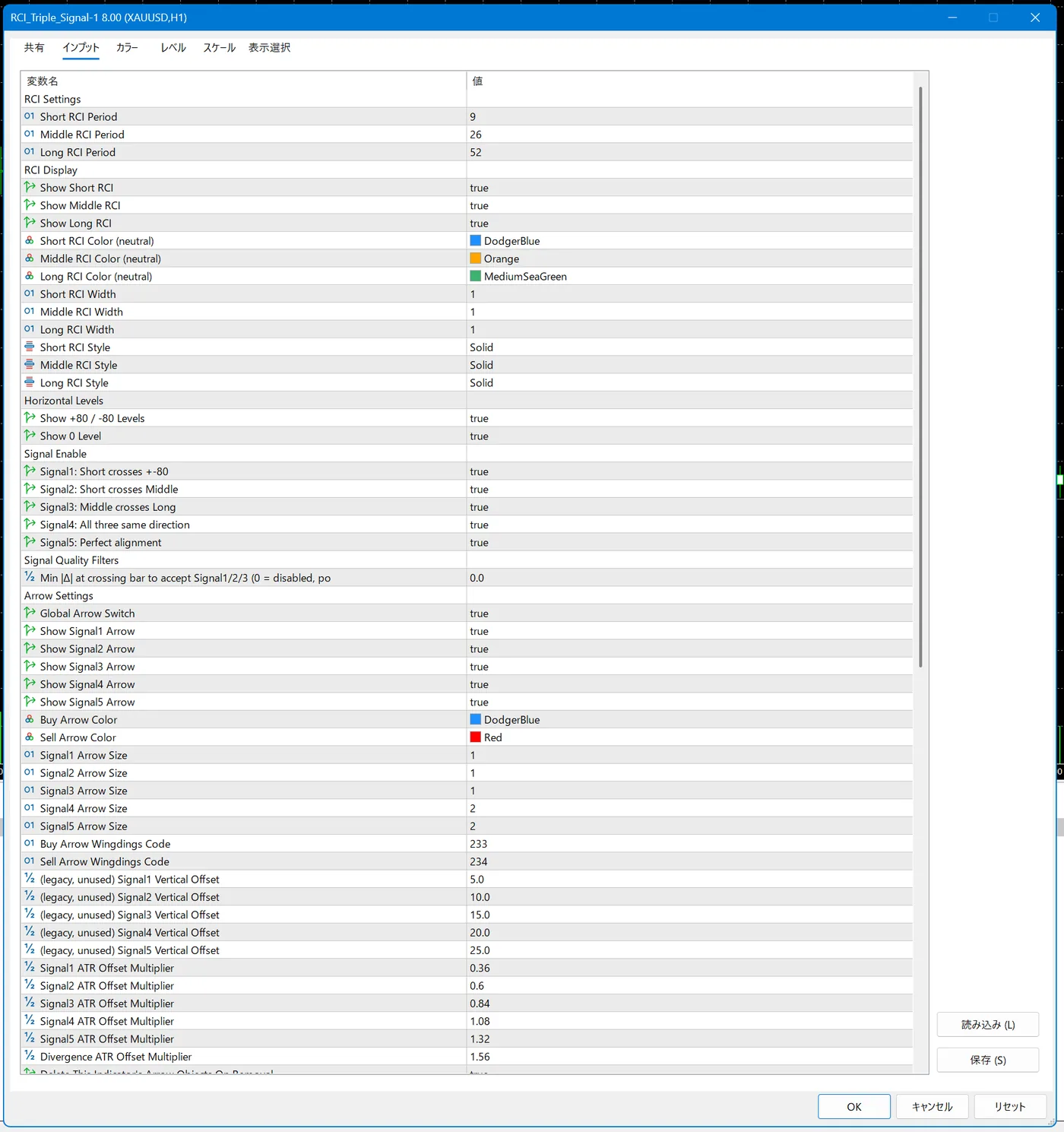
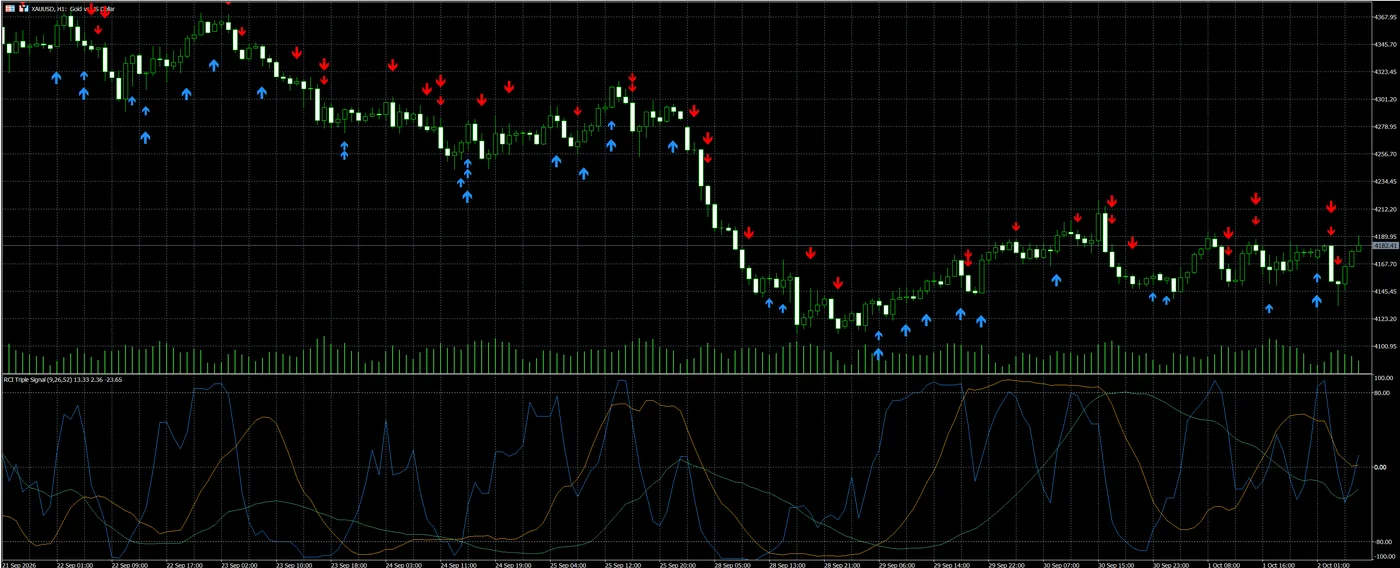
RCI Triple Signal is configured on the "Inputs" tab of the indicator settings window in MT5. By default, the periods are 9, 26, and 52; the five signals, arrows, and popup alerts are on; and divergence detection and multi-timeframe are off.
We distribute "RCI Triple Signal for MT5", which adds signal display and alerts for the three RCI lines, free of charge
Download RCI Triple Signal for free!Table of Contents
- Change the settings on the "Inputs" tab
- Change the RCI periods
- Change the line display, colors, and horizontal lines
- Turn the five signals on or off individually
- Adjust the arrow display
- Set how alerts are sent
- Multi-timeframe settings
- Divergence is off by default
- Settings on the Scale tab
- How to change settings by purpose
- Saving and resetting settings
- Frequently Asked Questions
- Summary
Change the settings on the "Inputs" tab
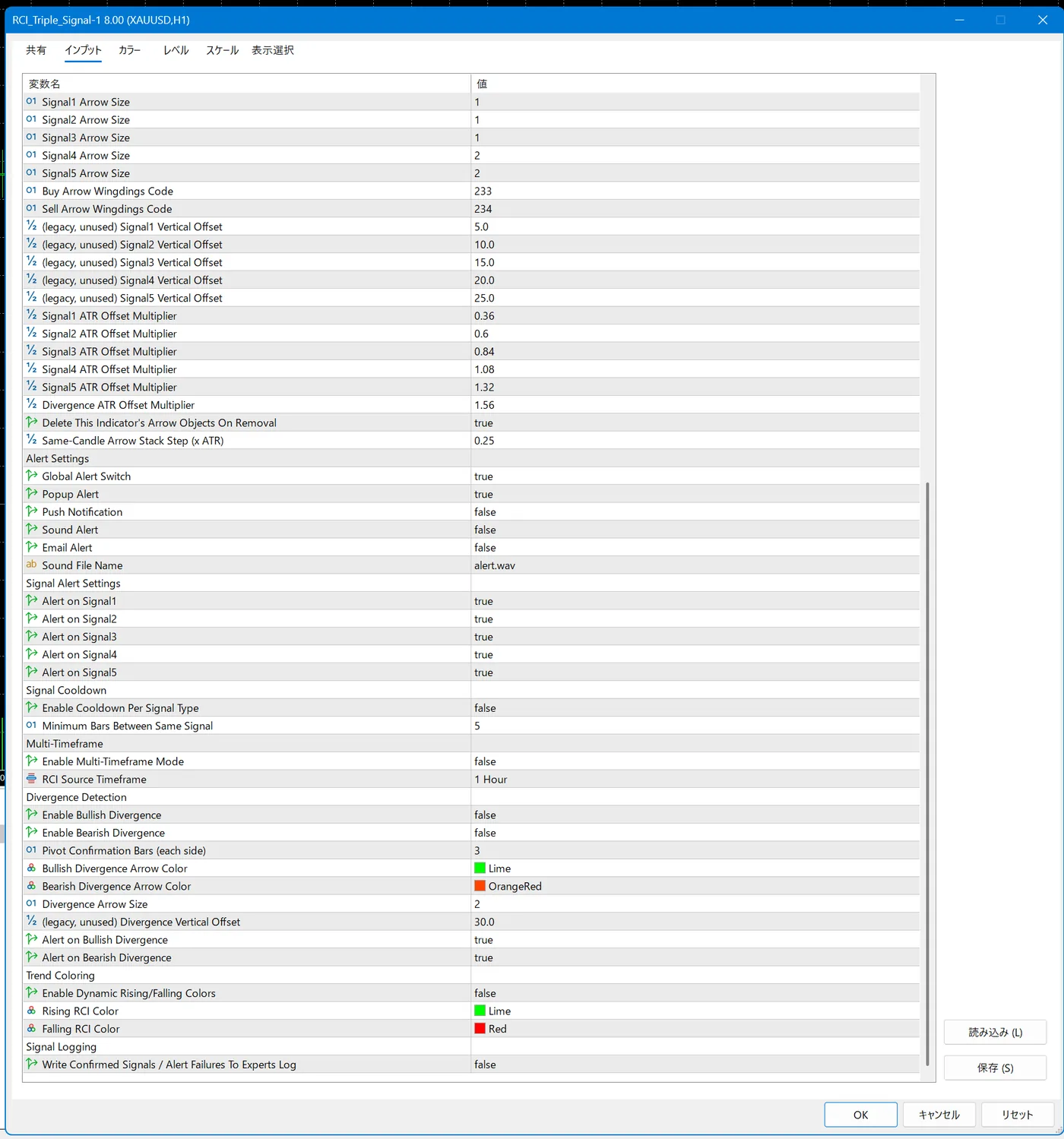
To open the settings window, right-click the indicator on the chart and select "Properties". The window has the tabs "Common", "Inputs", "Colors", "Levels", "Scale", and "Show", but the RCI Triple Signal items are all on the Inputs tab. The item names are in English and divided into groups.
If you have not installed the indicator yet, check the following article.
Change the RCI periods
"RCI Settings" has three items: Short RCI Period, Middle RCI Period, and Long RCI Period. They are the periods of the short-term, medium-term, and long-term RCI, and the default values are 9, 26, and 52.
RCI Triple Signal period items and their default values
| Item | Default | Role |
|---|---|---|
| Short RCI Period | 9 | Period of the short-term RCI |
| Middle RCI Period | 26 | Period of the medium-term RCI |
| Long RCI Period | 52 | Period of the long-term RCI |
The shorter the period, the faster the RCI reacts to recent price movement, and the larger the swings of the line. The longer the period, the smoother the movement, and the easier it is to see the bigger trend. Changing the period also changes where crossovers and same-direction alignment occur, so the timing of signals changes as well.
Change the line display, colors, and horizontal lines
In "RCI Display", you can change the on/off display (Show Short RCI, Show Middle RCI, Show Long RCI), color, thickness, and line style for each of the three lines. By default, all three lines are shown; the colors are DodgerBlue for short-term, Orange for medium-term, and MediumSeaGreen for long-term; the thickness is 1; and the line style is Solid.
In "Horizontal Levels", Show +80 / -80 Levels and Show 0 Level switch the display of the ±80 lines and the zero line. Both default to true.
Change the line color for rising and falling
"Trend Coloring" has items to specify Rising RCI Color for rising (default Lime) and Falling RCI Color for falling (default Red). Whether to use them is switched with Enable Dynamic Rising/Falling Colors, which defaults to false.
Turn the five signals on or off individually
"Signal Enable" has five items that switch Signal1 through Signal5 individually. All default to true.
RCI Triple Signal's five signal items
| Item | Default | Role |
|---|---|---|
| Signal1: Short crosses +-80 | true | Short-term RCI crosses the ±80 line |
| Signal2: Short crosses Middle | true | Short-term RCI crosses medium-term RCI |
| Signal3: Middle crosses Long | true | Medium-term RCI crosses long-term RCI |
| Signal4: All three same direction | true | The three RCI lines point in the same direction |
| Signal5: Perfect alignment | true | The three RCI lines are in matching order |
"Signal Quality Filters" has one item, Min |Δ| at crossing bar to accept Signal1/2/3, with a default of 0.0. As the 0 = disabled in the item name indicates, 0.0 means the condition is not used.
If you want to know how to read and choose between the five signals, check the following article.
Adjust the arrow display
"Arrow Settings" contains the items for the arrows that appear on the main chart. Global Arrow Switch turns all arrows on or off, and Show Signal1 Arrow through Show Signal5 Arrow switch them for each signal.
RCI Triple Signal arrow items and their default values
| Item | Default | Role |
|---|---|---|
| Global Arrow Switch | true | Turns all arrows on or off |
| Show Signal1〜5 Arrow | true | Turns the arrow for each signal on or off |
| Buy Arrow Color | DodgerBlue | Color of the buy arrow |
| Sell Arrow Color | Red | Color of the sell arrow |
| Signal1〜5 Arrow Size | 1・1・1・2・2 | Size of the arrows |
| Buy / Sell Arrow Wingdings Code | 233 / 234 | Character code that specifies the arrow shape |
| Signal1〜5 ATR Offset Multiplier | 0.36・0.6・0.84・1.08・1.32 | Adjusts the arrow position |
| Divergence ATR Offset Multiplier | 1.56 | Adjusts the position of divergence arrows |
| Same-Candle Arrow Stack Step (x ATR) | 0.25 | Vertical spacing between arrows stacked on the same candlestick |
| Delete This Indicator's Arrow Objects On Removal | true | Also deletes the arrows when the indicator is removed |
ATR Offset Multiplier adjusts the arrow position by a multiple of the ATR. The ATR is an indicator of the size of recent price movement, and the default values increase slightly from Signal1 to Signal5. The Vertical Offset items marked (legacy, unused) in their names are not used, so there is no need to change them.
Set how alerts are sent
"Alert Settings" switches the notification methods. Global Alert Switch turns all alerts on or off, and its default is true. For the notification methods, Popup Alert starts as true, and Push Notification, Sound Alert, and Email Alert start as false.
RCI Triple Signal alert items and their default values
| Item | Default | Role |
|---|---|---|
| Global Alert Switch | true | Turns all alerts on or off |
| Popup Alert | true | Notifies with a popup |
| Push Notification | false | Push notification to your smartphone |
| Sound Alert | false | Notifies with a sound |
| Email Alert | false | Notifies by email |
| Sound File Name | alert.wav | File name of the sound |
| Alert on Signal1〜5 | true | Turns the alert for each signal on or off |
| Enable Cooldown Per Signal Type | false | Switches "Signal Cooldown" on or off |
| Minimum Bars Between Same Signal | 5 | Minimum number of bars left between the same signal under "Signal Cooldown" |
To get notifications on your smartphone, set Push Notification to true. To receive push notifications, you need to register your smartphone's MetaQuotes ID in MT5. Email likewise requires email settings in the MT5 options.
Alert on Signal1 through Alert on Signal5 are the items that select which signals raise alerts. For a signal where you want the arrow but not the alert, leave the arrow's Show Signal Arrow as true and set only Alert on Signal to false.
Multi-timeframe settings
"Multi-Timeframe" has two items: Enable Multi-Timeframe Mode and RCI Source Timeframe. Enable Multi-Timeframe Mode defaults to false, and RCI Source Timeframe defaults to 1 Hour.
Divergence is off by default
In "Divergence Detection", Enable Bullish Divergence and Enable Bearish Divergence both default to false. To use divergence detection, set these two items to true. Divergence comes in bullish and bearish types, and each can be switched individually.
Pivot Confirmation Bars (each side) specifies the number of candlesticks on each side, with a default of 3. For the arrows, Bullish Divergence Arrow Color defaults to Lime, Bearish Divergence Arrow Color defaults to OrangeRed, and the size is set by Divergence Arrow Size, which defaults to 2.
Alerts are switched with Alert on Bullish Divergence and Alert on Bearish Divergence. Both default to true, but because detection itself is off, no alerts appear unless you first set the two Enable items to true.
Settings on the Scale tab
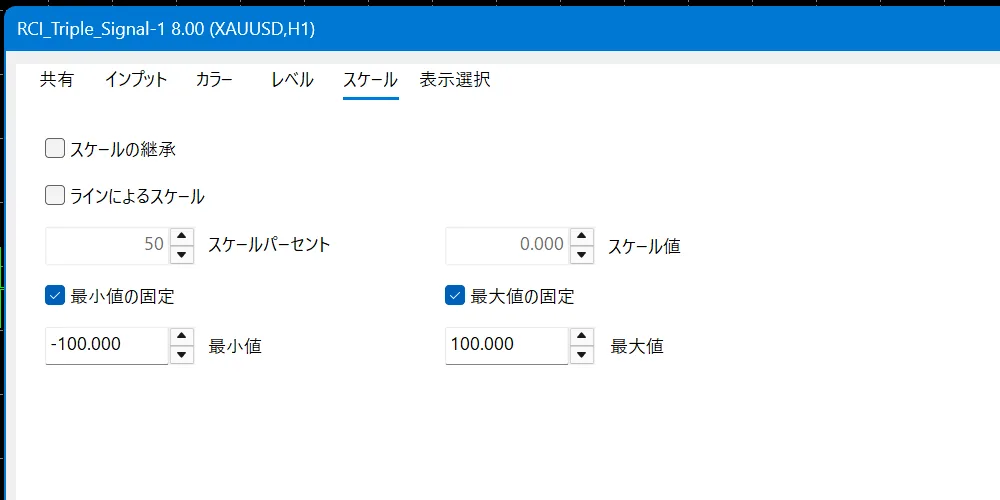
The vertical axis of the RCI subwindow is fixed on the "Scale" tab. The checkboxes for fixing the minimum and the maximum are ticked, with a minimum of -100 and a maximum of 100. Because RCI moves within the range of -100 to 100, you normally do not change this.
How to change settings by purpose
To reduce the number of arrows, set Show SignalN Arrow to false for the signals you do not use. To remove all arrows, set Global Arrow Switch to false.
To be notified while you are away from the chart, set Push Notification to true and register your MetaQuotes ID in MT5. Alert on SignalN lets you choose for each signal, so you can limit which signals send notifications.
To see divergence, set Enable Bullish Divergence and Enable Bearish Divergence to true.
Saving and resetting settings
At the bottom right of the Inputs tab are the "Load" and "Save" buttons. "Save" stores your changed settings in a file, and "Load" lets you use the same settings on another chart. Pressing "Reset" at the bottom of the settings window returns each item to its default value.
Frequently Asked Questions
Summary
The RCI Triple Signal settings can be sorted out by going through the Inputs tab items from the top. With the default values, the five signals, arrows, and popup alerts can be used, and divergence and multi-timeframe are off by default.
When you start, it is best to check the display with the default values, and change only the relevant items when a need arises, such as wanting fewer arrows or smartphone notifications.
We distribute "RCI Triple Signal for MT5", which adds signal display and alerts for the three RCI lines, free of charge
Download RCI Triple Signal for free!