What Is a Crypto Deposit at an Overseas FX Broker? | 4 Deposit Methods Other Than Bank Transfer and How a USDT Deposit Works
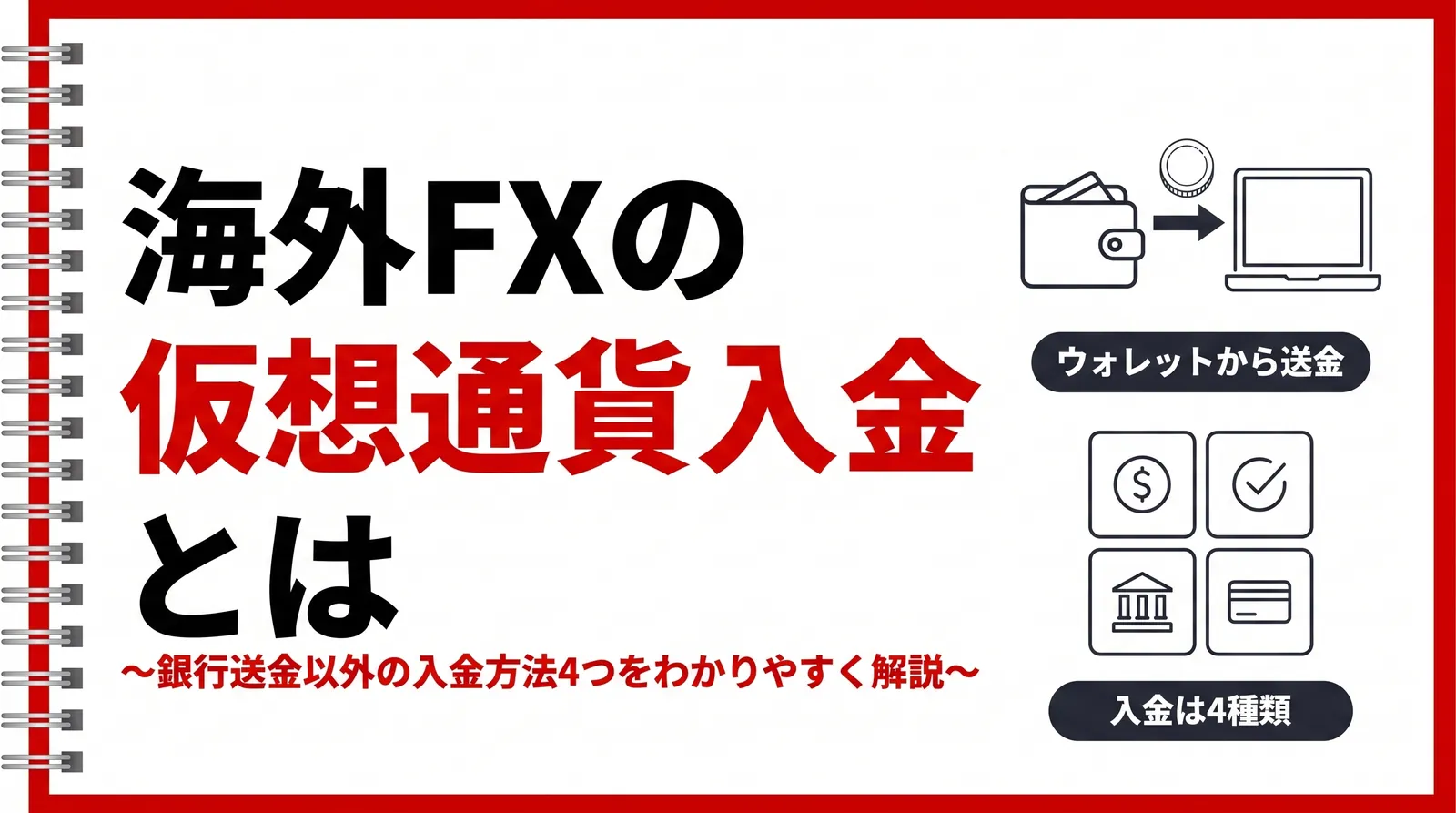
Do you want to try a crypto (crypto asset) deposit at an overseas FX broker, but don't know where to get USDT or what to do after sending it? Or would you like to know about deposit methods other than bank transfer? Because crypto deposits don't go through a bank, you can send funds even on weekends and public holidays.
This article explains how to make a crypto deposit at an overseas FX broker and the deposit methods other than bank transfer. Using EdgeGraph FX's deposit screen as an example, we look at the methods you can actually choose.
Table of Contents
- How crypto deposits at overseas FX brokers work
- Why consider deposit methods other than bank transfer
- Two constraints when sending from a domestic exchange to an overseas FX broker
- 3 routes for crypto deposits
- 4 deposit methods other than bank transfer
- The flow of depositing with USDT
- Deposit and withdrawal methods don't match
- FAQ
- Summary
How crypto deposits at overseas FX brokers work
Funds are sent on the blockchain without going through a bank
A crypto deposit is a method in which you deposit by sending cryptocurrency from your own wallet to the destination address specified by the FX broker. Because the transfer of funds takes place on the blockchain, it doesn't go through a bank or a payment service provider. Once the transfer is confirmed, it is processed as a deposit.
The wallet you send from is an app for storing cryptocurrency. An address for receiving is assigned to each wallet, and this becomes the sending address in your deposit request. The address shown on the broker's deposit screen is the destination.
You need just two pieces of information for a transfer: the address and the amount. You don't need to submit additional identity verification documents or open a new account for the deposit. If you already hold cryptocurrency, you can open your wallet and send right away.
Currencies and networks available for crypto deposits
For a crypto deposit, you choose two things: the currency you send and the network that carries it. In EdgeGraph FX's deposit request, these combinations are grouped into the following four currency types.
- BTC
- USDT-ERC20
- USDT-TRC20
- USDT-BEP20
USDT is a stablecoin pegged to the dollar. Because its value is unlikely to move much during the transfer, you can send exactly the amount you want to deposit.
USDT-ERC20, USDT-TRC20, and USDT-BEP20 are categories for sending the same USDT over different networks. ERC20 uses Ethereum, TRC20 uses TRON, and BEP20 uses BNB Smart Chain.
Always make the currency type you select on the deposit screen match the network you actually send over
If you send over a different network, the USDT you sent can no longer be received
You can also deposit by choosing BTC. However, because BTC is a cryptocurrency whose price moves, its value is likely to change between the time you send it and the time it arrives. If you want to match the deposit amount precisely, choose USDT.
Differences from bank transfer
With bank transfer and crypto deposit, the route the funds take and what you need to prepare in advance differ. Check the table below.
Differences between bank transfer and crypto deposit
| Item | Bank transfer | Cryptocurrency deposit |
|---|---|---|
| Route the funds take | Bank | Blockchain |
| What to prepare in advance | A bank account that can make transfers | A wallet and cryptocurrency |
| How the destination is specified | Account details | A string of characters (the address) |
| Hours when you can send | Bank business hours and internet banking operating hours | 24 hours |
You can send even on weekends and public holidays when banks are closed. If you keep the funds you use for trading in a wallet on hand, you can send them right away whenever you want to deposit.
Why consider deposit methods other than bank transfer
On June 1, 2026, the amended Payment Services Act came into force, imposing a registration obligation on cross-border payment collection agency services. It targets businesses that receive funds from users in Japan and handle the work of passing them on to counterparties overseas.
Only businesses that operate collection agency services as a business are subject to the registration obligation. Overseas FX brokers and the individual users who deposit into their accounts are not subject to this registration.
If you rely on a single deposit route, you can't deposit when that route is unavailable. With a broker that offers multiple deposit methods, you can decide on a backup route in addition to the one you normally use. In EdgeGraph FX's case, there are four routes in addition to bank transfer.
Two constraints when sending from a domestic exchange to an overseas FX broker
The part of a crypto deposit people tend to stumble on is not the transfer operation but preparing the USDT. If you live in Japan, you face the following two constraints.
You can't buy USDT on a domestic exchange
Japan's crypto asset exchanges do not handle USDT. Among stablecoins pegged to the US dollar, USDC has become available for purchase in Japan too, but you cannot buy USDT directly in Japan. Assume that you can't simply top up USDT on the domestic exchange you normally use.
Domestic exchanges also have no mechanism for buying crypto assets with a credit card. To prepare USDT, you will have to use something other than a domestic exchange.
The Travel Rule limits where you can send
When transferring crypto assets, the sending exchange is obliged to notify the destination of the sender's and recipient's information. This is the Travel Rule. In Japan, it has been mandatory for all domestic crypto asset exchanges since June 1, 2023.
You may be unable to send to a counterparty whose notification mechanism doesn't match. When sending from a domestic exchange to an overseas destination, transfers have come to be restricted, or you have been asked to declare the purpose of the transfer.
On the other hand, personal wallets that you manage yourself are outside the scope of the Travel Rule. You can send from a domestic exchange to a personal wallet, and from there on you can send with your own operation.
3 routes for crypto deposits
Because of these two constraints, the routes for depositing with cryptocurrency boil down to roughly the following three.
3 routes for crypto deposits
| Route | What it goes through | Exchange step needed? | Best for |
|---|---|---|---|
| Buy with the on-ramp | Credit card | No | Beginners and those who want to deposit right away |
| Buy BTC and send it | Domestic exchange and a personal wallet | No | People who already use a domestic exchange |
| Exchange to USDT and send it | Domestic exchange, personal wallet, overseas exchange | Yes | People who want to keep transfer fees low |
Route 1: Buy with a credit card through the on-ramp
On the purchase page that EdgeGraph FX guides you to, you can buy USDT with a credit card. No account registration or identity verification is required, and the amount you can buy ranges from 100 USD to 1200 USD. Because it doesn't go through a domestic exchange, neither the constraint that USDT can't be bought nor the Travel Rule applies. It is the route with the fewest steps.
Route 2: Buy BTC on a domestic exchange and send it from a wallet
EdgeGraph FX also accepts deposits in BTC. If you buy BTC on a domestic exchange, send it to a personal wallet, and send it from there to the deposit address, you can deposit without preparing USDT. Because no exchange step is involved, there are fewer operations.
However, the price of BTC moves. Its value changes between the time you send it and the time it arrives, so if you want the amount credited to your account to match exactly, choose USDT.
Route 3: Exchange to USDT on an overseas exchange and send it
In this method, you send BTC or XRP bought on a domestic exchange to a personal wallet, exchange it to USDT on an overseas exchange, and then send it to the deposit address. It involves the most stops along the way, but you can choose a network with low transfer fees.
Exchanging crypto makes it subject to tax
Profits made by selling crypto assets or exchanging them for other crypto assets are, in principle, classified as miscellaneous income and require a final income tax return. When you exchange BTC for USDT, as in Route 3, the gain or loss is fixed at the rate at the time of the exchange. Even for small amounts, you must calculate it for each transaction, so keep a record of what you exchanged, when, and for how much.
Want to know more about overseas FX taxes? Read this article.
▶︎How Much Tax Do You Actually Pay on Overseas FX? Break-Even Points by Taxable Income Bracket, and What to Know Before You Start
4 deposit methods other than bank transfer
The deposit methods other than bank transfer fall into four types depending on where the funds pass through: a type where you send cryptocurrency directly from a wallet, a type where you buy and use prepaid electronic money, a type that goes through a payment service provider account, and a type where you put Japanese yen into a dedicated account and then send it. What you need to prepare and the number of steps before the funds reach you differ by type.
At EdgeGraph FX, these four types are offered as cryptocurrency, PoiTouch, PayWave, and Peska. All of them are requested from the deposit menu on your member page, so the flow of operations on the broker's side is the same. The difference is what you prepare before requesting, so check the table below.
4 deposit methods you can choose at EdgeGraph FX
| Deposit method | Preparation needed in advance | Recommended for |
|---|---|---|
| Cryptocurrency | A wallet and cryptocurrency | People who already hold cryptocurrency |
| PoiTouch | Buy a DEPOT at PRE-BOX | People who don't want to register yet another new account |
| PayWave | Create a PayWave account | People who want to use the same method for deposits and withdrawals |
| Peska | Open a Peska account, identity verification, and two-step verification | People who want to move funds from a bank and use them |
For people who already hold cryptocurrency, cryptocurrency deposit is the top recommendation. With a wallet and the destination address, you can go straight ahead with the deposit procedure.
For a cryptocurrency deposit, you submit a request from the deposit menu on your member page and send to the address displayed. The amount credited to your account is determined by the rate at the time the funds arrive, so send a little more than the amount you want to deposit.
Want to know the PoiTouch deposit steps in detail? Read this article.
▶︎How to Deposit with PoiTouch at EdgeGraph FX: Step-by-Step Guide from Buying a DEPOT to Submitting Your Deposit Request
Want to know the PayWave deposit steps in detail? Read this article.
▶︎EdgeGraph FX PayWave Deposit Guide | Steps and Tips Explained Simply
Want to know the Peska deposit steps in detail? Read this article.
▶︎How to Deposit to EdgeGraph FX with Peska | Steps and Tips to Avoid Mistakes
The flow of depositing with USDT
From here, we briefly explain the flow up to depositing with USDT. Buying USDT and the deposit operation at EdgeGraph FX are each explained in detail in separate articles, so check those as well when you actually proceed.
Want to know the steps for buying USDT in detail? Read this article.
▶︎How to Buy USDT with the EdgeGraph FX On-Ramp: Buying with a Credit Card and Deposit Steps Explained
Want to know the cryptocurrency deposit operation steps in detail? Read this article.
▶︎How to Deposit Cryptocurrency to EdgeGraph FX | Supported Currencies and the 5-Step Procedure
Proceed in the following 3 steps.
- Step 1 Prepare USDT
- Step 2 Submit a deposit request on your member page
- Step 3 Send to the destination address displayed
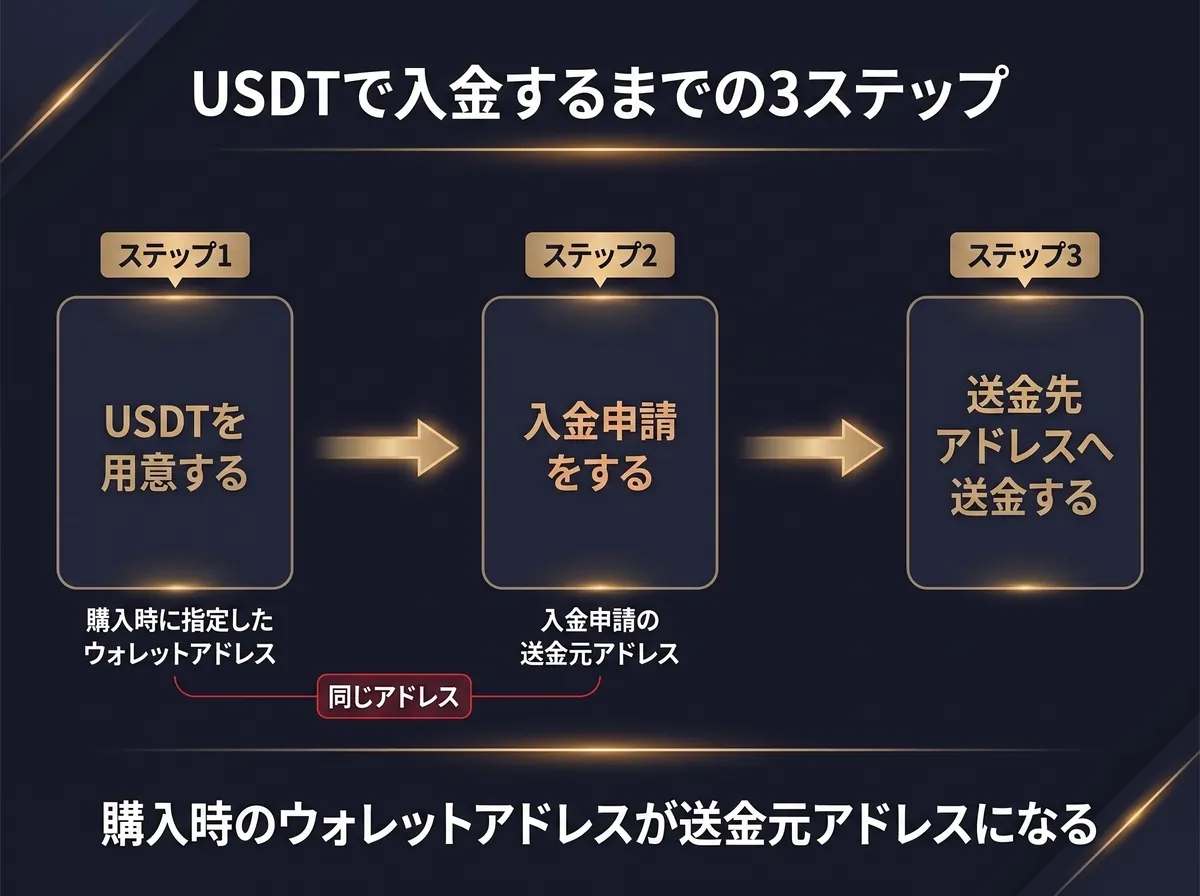
If you don't have USDT, you can prepare it on the on-ramp purchase page that EdgeGraph FX guides you to. The amount you can buy ranges from 100 USD to 1200 USD, and you can buy without registering an account on the purchase page.
The wallet address used when buying becomes the sending address
In the “sending address” field of the deposit request, enter the address of your own wallet that you specified as the destination for the USDT. If you connected a wallet when buying on the on-ramp, the connected address is used; if you chose manual entry, the address you pasted becomes the sending address as is.
Buying and depositing are separate procedures. If you make the receiving address used when buying the same as the sending address you enter in the deposit request, things go smoothly. If you have several wallets, take care not to mix up which wallet you received in.
At the point when you finish paying on the purchase page, the funds have not yet been reflected in your trading account balance
Deposit and withdrawal methods don't match
Withdrawals are via Peska, PayWave, or cryptocurrency
At EdgeGraph FX, the methods you can use for withdrawals are Peska, PayWave, and cryptocurrency. PoiTouch supports deposits only. Also, direct bank transfer withdrawals are currently suspended, so please use Peska to withdraw to a domestic bank account.
Even funds deposited in cryptocurrency are withdrawn by choosing one of Peska, PayWave, or cryptocurrency. Check the table below for the correspondence for each deposit method.
Deposit methods and withdrawal support
| Deposit method | Can you withdraw with the same method? |
|---|---|
| Cryptocurrency | Yes |
| PoiTouch | No |
| PayWave | Yes |
| Peska | Yes |
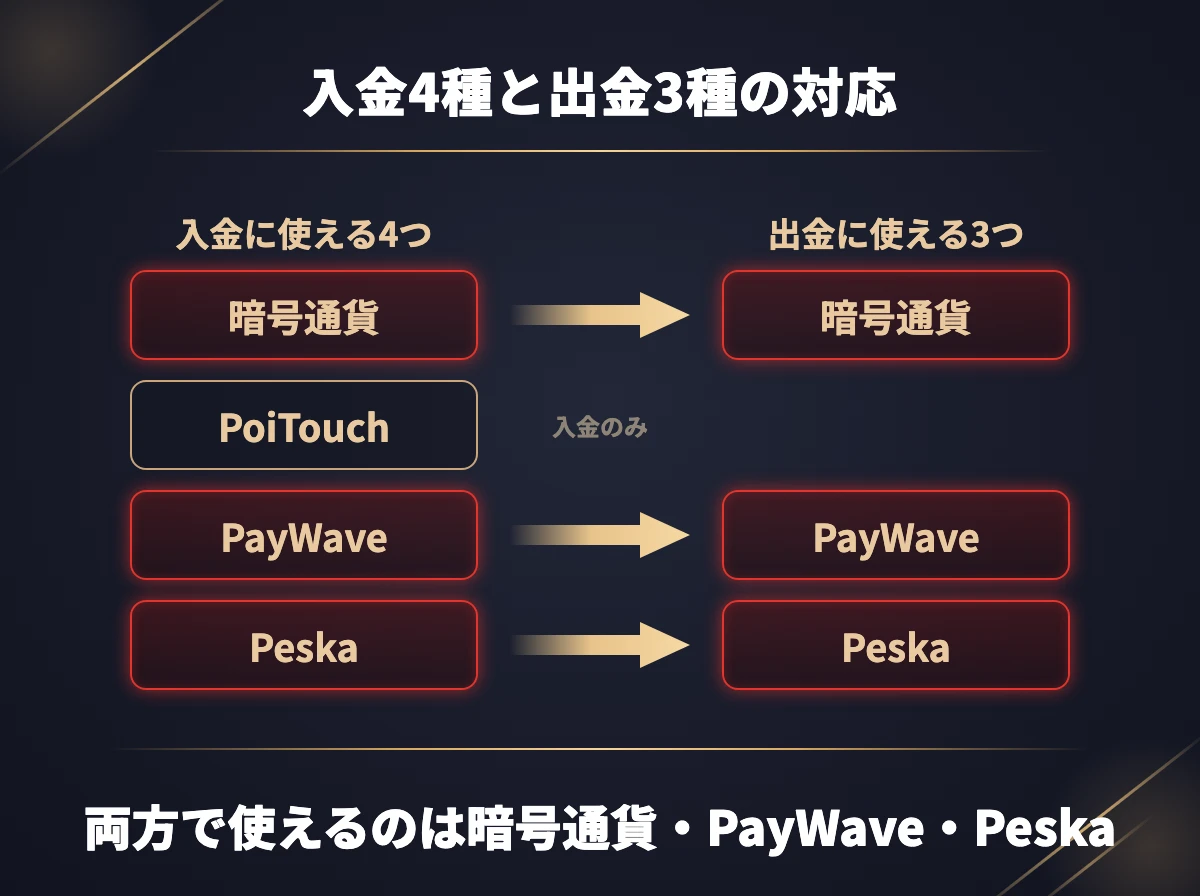
With Peska, you receive funds in yen into a bank account in Japan. Cryptocurrency withdrawal is recommended for those who want to receive in cryptocurrency, and PayWave for those who want to send funds overseas.
Of the four deposit methods, the ones you can use for both deposits and withdrawals are the three of cryptocurrency, PayWave, and Peska; PoiTouch is for deposits only. When you decide on a deposit method, choose your withdrawal method at the same time.
Conditions for withdrawing
- Withdrawals to a domestic bank via Peska go only to financial institutions in Japan and are processed in yen
- It normally takes 2 to 5 business days for funds to arrive
- The withdrawal fee applies regardless of the amount: 1% of the withdrawal amount for Peska and PayWave, and 2% for cryptocurrency
- You cannot request a withdrawal while holding open positions
Because the withdrawal fee is a fixed percentage of the withdrawal amount, the total fee is the same whether you combine requests into one or split them into several. If you have decided on the amount you want to withdraw, close your positions first and then submit your request.
FAQ
Summary
- You can't buy USDT on a domestic exchange. Either use the on-ramp that lets you buy with a credit card, or choose the route of sending BTC via a personal wallet
- For deposits other than bank transfer, cryptocurrency deposit is the quickest. If you have cryptocurrency in a wallet, you can finish with a deposit request and a transfer
- The methods you can use for withdrawals are the three of Peska, PayWave, and cryptocurrency. Choose cryptocurrency withdrawal if you want to receive in cryptocurrency, and PayWave if you want to send funds overseas