How to Buy USDT with the EdgeGraph FX On-Ramp: Buying with a Credit Card and Deposit Steps Explained
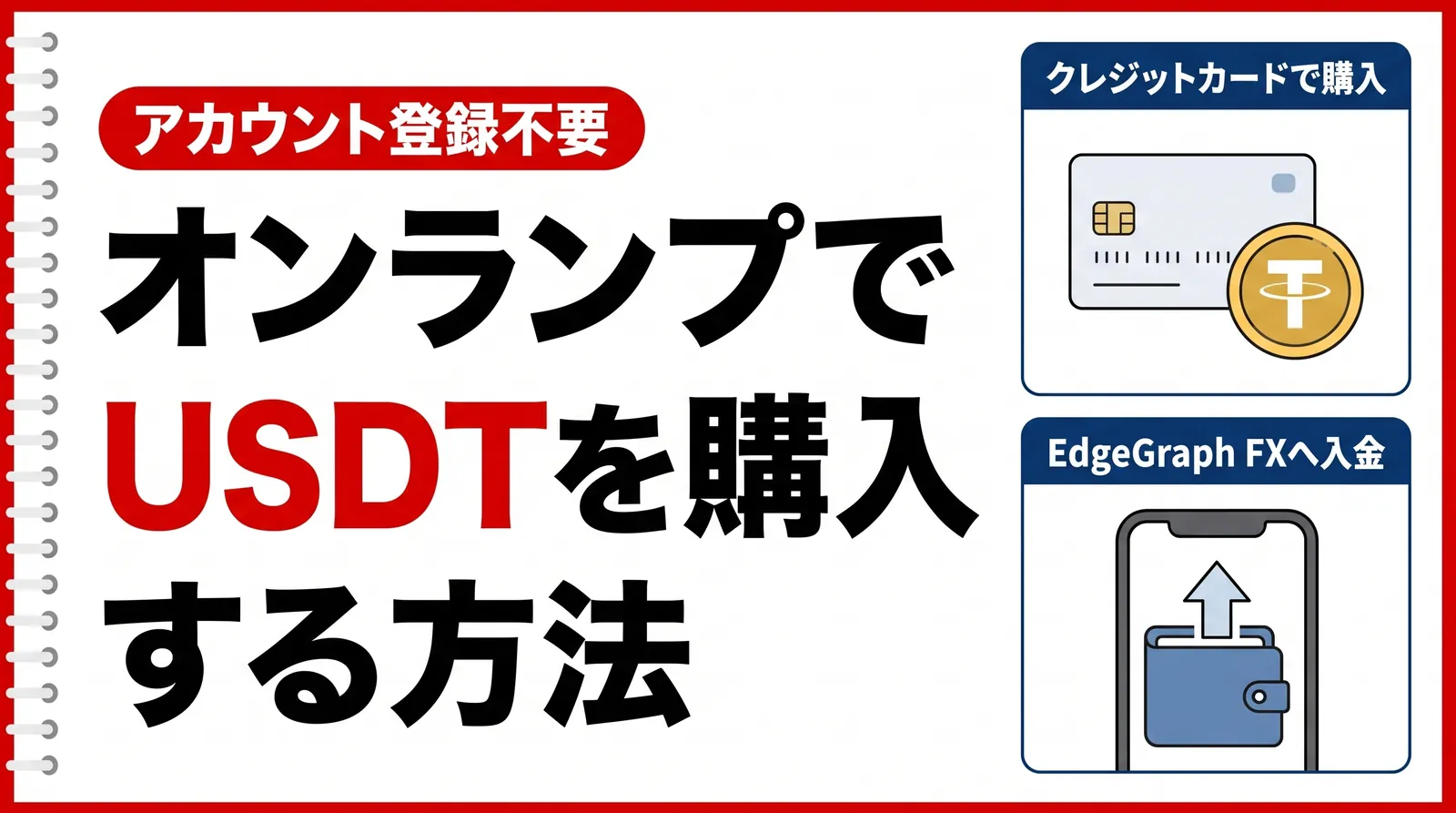
Do you ever want to deposit to EdgeGraph FX with USDT, but you don't own a single USDT, or you're a little short of the amount you want to deposit? In that case, you can get USDT through the on-ramp. An on-ramp is a system that lets you buy cryptocurrency directly with fiat currency such as Japanese yen or US dollars, and it is now available at EdgeGraph FX as well.
In short, buying USDT through the on-ramp takes the following 5 steps. No account registration is required.
- Step 1: Open the purchase page
- Step 2: Enter your customer information
- Step 3: Enter the offer price
- Step 4: Set your wallet address
- Step 5: Buy and complete the payment
The USDT you buy first arrives in your own wallet. From there, you submit a deposit request from the deposit menu on the member page and transfer the funds to the destination address shown, which completes the deposit. Please note that buying and depositing are separate procedures.
Click here to buy USDT with the on-ramp
Open the USDT purchase pageTable of Contents
- Domestic Exchanges Can't Supply USDT
- Buying with the On-Ramp and Depositing to EdgeGraph FX
- Comparing Ways to Get USDT
- Steps to Buy USDT with the On-Ramp
- Steps to Deposit Your Purchased USDT to EdgeGraph FX
- Watch Out for Network Mistakes
- Common Stumbling Points When Buying and Depositing
- FAQ
- Q1. If I buy through the on-ramp, is my deposit to EdgeGraph FX also completed?
- Q2. What do I enter in the “sender address” of the deposit request?
- Q3. If I received USDT on BNB Smart Chain, which one do I choose on the deposit page?
- Q4. Can I buy through the on-ramp even if I don't have a wallet?
- Q5. Do I need my EdgeGraph FX account number on the purchase page?
- Summary
Domestic Exchanges Can't Supply USDT
If you want to deposit to EdgeGraph FX with USDT, you will probably first struggle with where to get it. Crypto asset exchanges in Japan do not handle USDT, so you cannot top up at the domestic exchange you normally use. Domestic exchanges also have no way to buy cryptocurrency with a credit card. On top of that, even if you try to buy from another service with a Japanese credit card, the payment may be declined and the purchase may not go through.
With the on-ramp, you can buy USDT with a credit card without registering an account, and receive it in your own wallet.
Buying with the On-Ramp and Depositing to EdgeGraph FX
The on-ramp purchase page is not linked to the EdgeGraph FX member page, so completing only the purchase will not be reflected in your trading account balance.
If you use the same address as both the receiving address when buying through the on-ramp and the wallet address when depositing to EdgeGraph FX, you can go smoothly from buying USDT to depositing.
The specifications of the purchase page are as follows.
Purchase page specifications
| Item | Details |
|---|---|
| Cryptocurrency you can buy | USDT |
| Purchase amount | From 100USD to 1200USD |
| Account registration | Not required |
| Information to enter | Email address, full name, phone number |
| Where you receive it | Your own wallet |
| Relationship with your EdgeGraph FX account | A separate service |
Comparing Ways to Get USDT
Buying through the on-ramp is not the only way to get USDT. The table below summarizes what you need to prepare and how you pay for each method.
Comparing Ways to Get USDT
| Way to get it | What to prepare | Payment method | Recommended for |
|---|---|---|---|
| Buying through the on-ramp | Email address, full name, phone number, and a wallet | Credit card | People who don't own any cryptocurrency |
| Transferring cryptocurrency you already own | The sending wallet and its address | No purchase needed | People who already hold USDT or BTC |
| Buying on an overseas exchange and transferring | Opening an overseas exchange account and identity verification | Payment methods supported by the exchange | People who already have an overseas exchange account |
| Converting via a domestic exchange and then an overseas exchange | Opening accounts at a domestic exchange and an overseas exchange, identity verification | Bank transfer, instant deposit | People who plan to keep buying and selling cryptocurrency |
Buying through the on-ramp requires neither opening an account nor identity verification and is completed within the purchase page, so it is the most recommended way to buy.
Want to know about other deposit methods too? Check out this article!
▶︎What Are the EdgeGraph FX Deposit Methods? A Clear Guide to the List of Methods and How to Use Them!
Steps to Buy USDT with the On-Ramp
Step 1: Open the purchase page
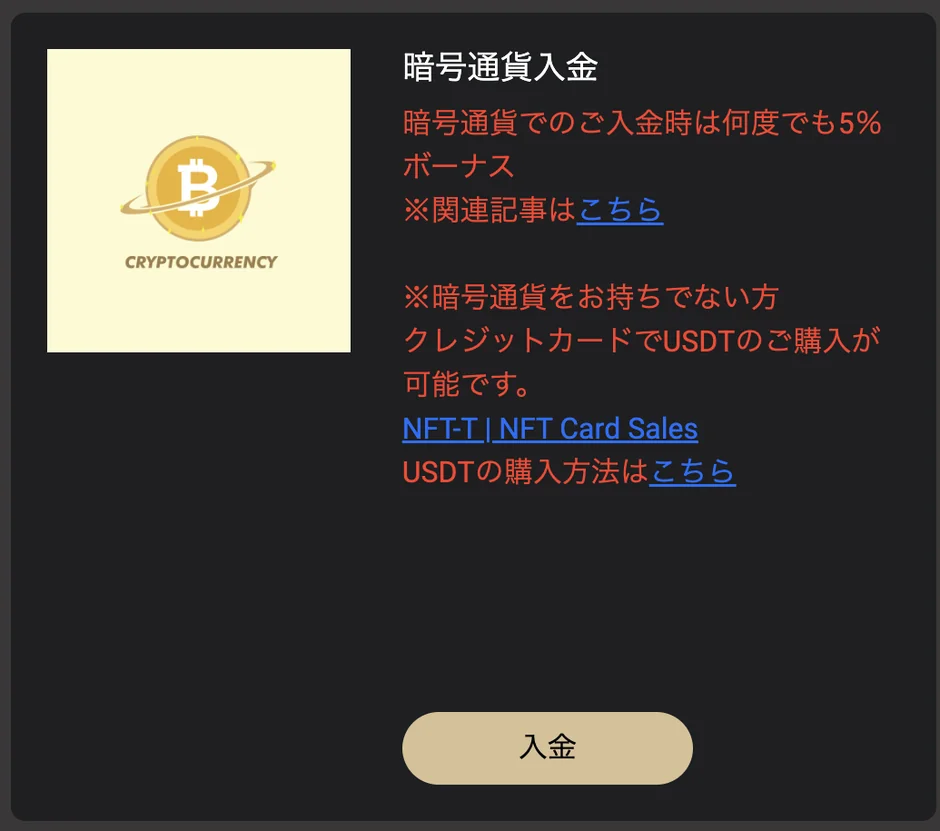
Open the USDT purchase page. You can also open it from the “NFT-T | NFT Card Sales” link under cryptocurrency deposit on the EdgeGraph FX deposit page. No account registration is required.
↓ Click here to buy USDT with the on-ramp ↓
▶︎Open the USDT purchase page
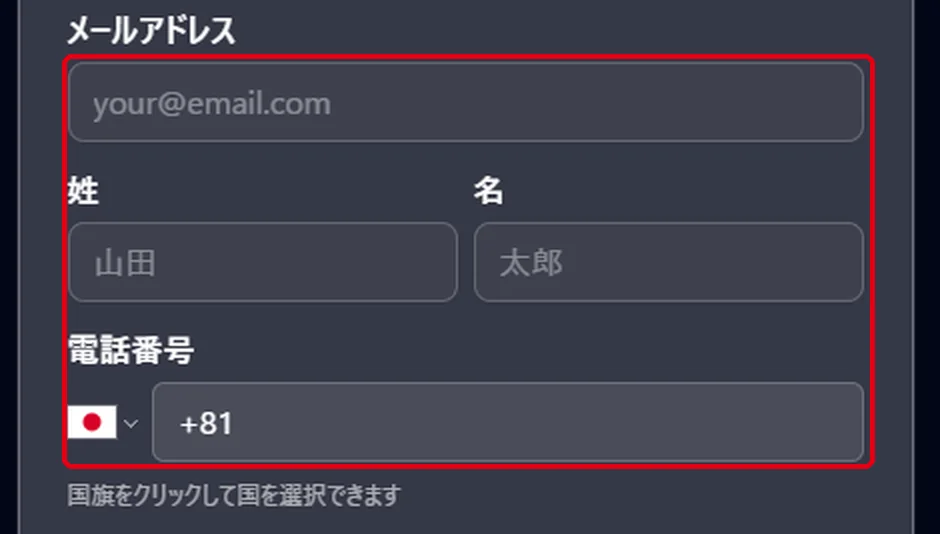
Step 2: Enter your customer information
Enter your email address, full name, and phone number. For the phone number, tap the flag to choose your country, then enter the number.
Step 3: Enter the offer price
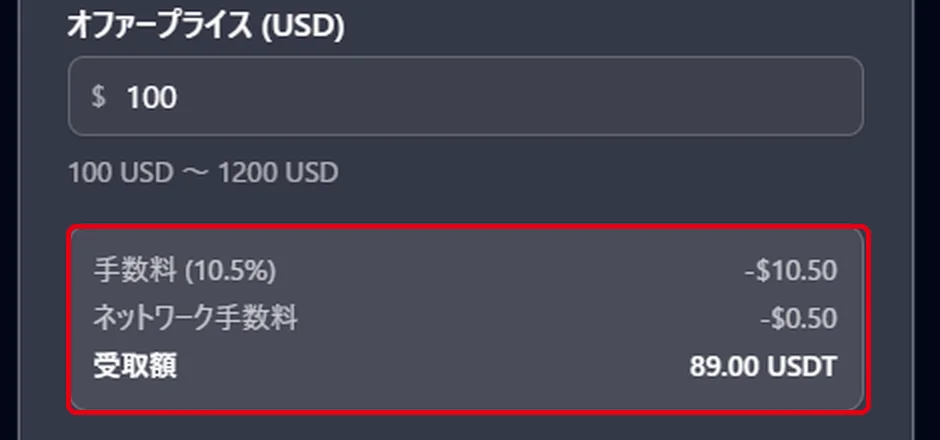
Enter the amount you want to buy in USD. The range you can enter is from 100USD to 1200USD.
Once you enter an amount, the fee and the amount of USDT you will actually receive appear below the input field. The received amount is what will arrive in your wallet, so check before you buy whether it meets the amount you want to deposit.
Step 4: Set your wallet address
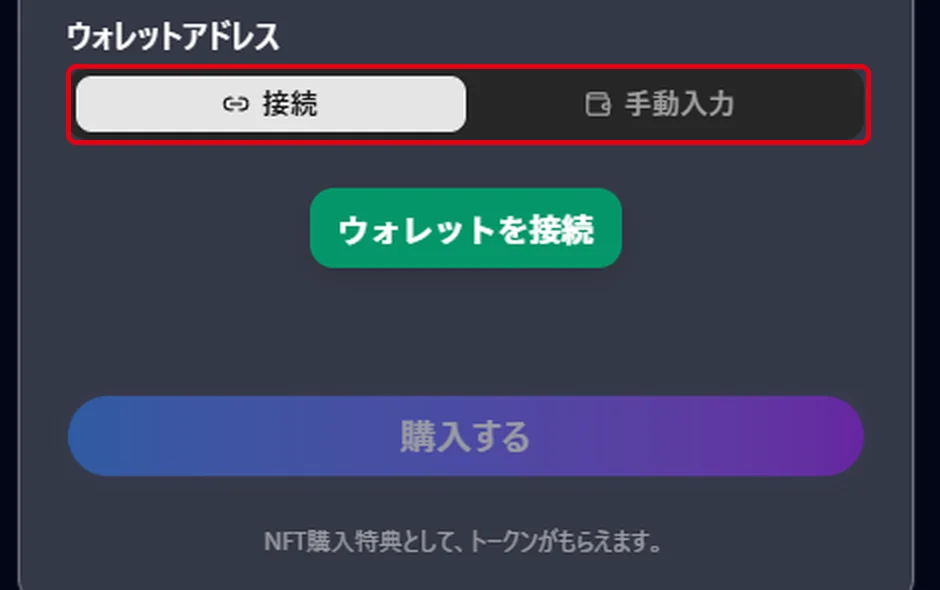
Specify where the USDT you buy will be delivered. You can choose between two methods: connecting a wallet, or entering the address manually.
To connect a wallet, choose “Connect” and press “Connect Wallet.” When the selection screen opens, choose the wallet you will use.
- RC Wallet
- Browser Wallet
- MetaMask
- WalletConnect
- Rainbow
We recommend RC Wallet. When you choose RC Wallet, a QR code is displayed, and scanning it with the RC Wallet app completes the connection. If you don't have the app, you can download it from “Get.” If you don't have any wallet at all, prepare one from “Get a wallet.”
To enter the address manually, choose “Manual input,” select the chain, and then paste your wallet address. We recommend copying and pasting the address rather than typing it by hand. If you get the address or the network wrong, the USDT sent cannot be recovered, so please be careful.
The address you specify here will be used as is in the deposit request that follows.
Step 5: Buy and complete the payment
Press “Buy” and follow the on-screen instructions to complete the payment. Below the button there is a notice about the NFT purchase bonus, and the USDT is provided as this bonus. Once the payment is finished, the USDT is sent to the wallet you specified in Step 4.
Open your wallet and check whether the USDT has arrived. If it doesn't appear, check whether the network displayed in your wallet matches the chain you chose at the time of purchase. Even for the same USDT, a different network is shown as a separate balance.
Steps to Deposit Your Purchased USDT to EdgeGraph FX
From here, we briefly explain how to deposit the USDT you bought to EdgeGraph FX. For details, see our article on how to deposit cryptocurrency.
Want to know the cryptocurrency deposit steps in detail? Check out this article!
▶︎How to Deposit Cryptocurrency to EdgeGraph FX | Supported Currencies and the 5-Step Procedure
Once the USDT has arrived, go back to the EdgeGraph FX member page.
- Log in to the member page, open the cryptocurrency deposit page from the deposit menu, and enter your MT5 account number.
- Select the currency type. Choose the one on the same network as the USDT you bought.
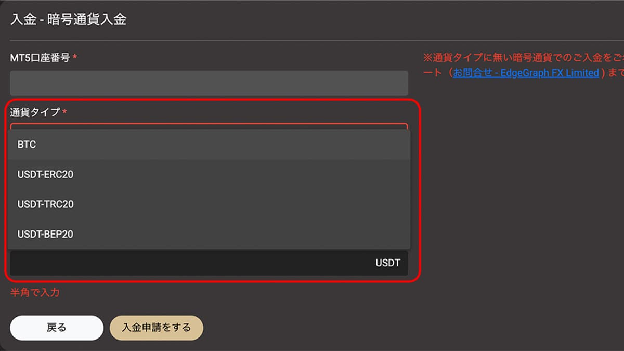
- Enter the sender address. This is the address of your own wallet that you specified as the delivery destination when buying through the on-ramp.
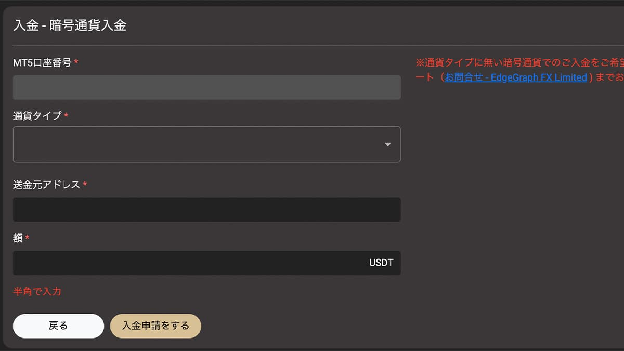
- Enter the amount in half-width characters.
- Press “Submit deposit request,” and the destination address and a QR code will be displayed.
- Send the requested amount to the destination address shown.
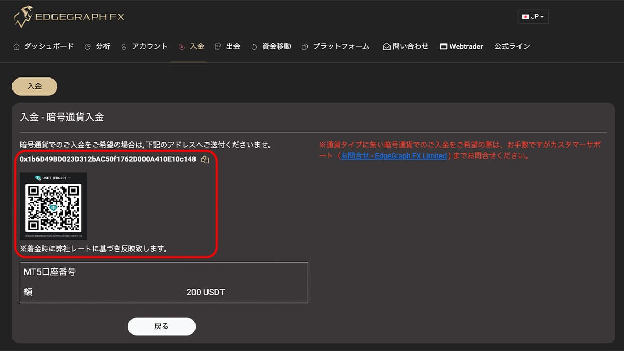
In the sender address field, it is fine to enter the address you specified as the delivery destination when buying through the on-ramp. The amount credited to your account is determined by the rate at the time the funds arrive, so the amount of USDT that reaches your wallet does not directly become your account balance.
Watch Out for Network Mistakes
There are 4 currency types you can choose on the EdgeGraph FX deposit page. The network each one uses is as follows.
Currency types and networks
| Currency type | Network |
|---|---|
| BTC | Bitcoin network |
| USDT-ERC20 | Ethereum |
| USDT-TRC20 | TRON |
| USDT-BEP20 | BNB Smart Chain |
Note that the same network can go by several names. BNB Smart Chain is also called BSC or BEP20. If you chose BNB Smart Chain on the on-ramp to receive USDT, choose USDT-BEP20 on the EdgeGraph FX deposit page. They are the same network under different names, so if you think it is a different network and choose again, you will not receive the USDT you sent.
If you deposit with USDT, we recommend USDT-TRC20. Network fees are low and processing is fast.
Common Stumbling Points When Buying and Depositing
The Purchase Amount and the Deposit Amount Won't Match
The minimum purchase on the on-ramp is 100USD. Because the amount that reaches your wallet is this minus fees, buying 100USD will leave you with less than 100USDT. Decide the amount you want to deposit first, then adjust your purchase amount so that the amount you receive meets it.
Deposit Fees Vary by Deposit Method
Deposit methods and fees
| Deposit method | EdgeGraph FX-side fee |
|---|---|
| Bank transfer: under 50,000 JPY | 1,000 JPY |
| Bank transfer: 50,000 JPY or more | Free |
| Cryptocurrency deposit | Free |
Cryptocurrency deposits carry no fee on the EdgeGraph FX side. However, network fees for sending and fees for buying through the on-ramp are charged separately.
Note Your MT5 Account Number in Advance
The purchase page doesn't use your MT5 account number, but the deposit request requires you to enter it first. Check it on the member page before you start buying.
FAQ
Q1. If I buy through the on-ramp, is my deposit to EdgeGraph FX also completed?
No, it isn't. The USDT you buy simply arrives in your own wallet first, so you need to go on to submit a deposit request from the deposit menu on the member page and transfer the funds to the destination address shown.
Q2. What do I enter in the “sender address” of the deposit request?
Enter the address of your own wallet that you specified as the delivery destination for the USDT when buying through the on-ramp. If you connected a wallet at the time of purchase, the connected address is your sender address; if you chose manual input, the address you pasted is your sender address as is.
Q3. If I received USDT on BNB Smart Chain, which one do I choose on the deposit page?
Choose USDT-BEP20. BNB Smart Chain is also called BSC or BEP20, so they may look like different things, but they are all the same network.
Q4. Can I buy through the on-ramp even if I don't have a wallet?
Yes, you can. You can set one up from “Get a wallet” on the wallet selection screen, and if you choose RC Wallet, you can download the app right there. If you already have an address, you can also buy simply by pasting it with “Manual input.”
Q5. Do I need my EdgeGraph FX account number on the purchase page?
No. All you enter on the purchase page is your email address, full name, phone number, and the destination wallet address. Your MT5 account number is entered first in the deposit request after you buy.
Summary
- Buying and depositing are separate procedures. If you note your MT5 account number and the destination wallet address before buying, you can move smoothly through to the deposit request
- The USDT you receive is the purchase amount minus fees, and the amount credited to your account is determined by the rate when the funds arrive. Work backward from the amount you want to deposit to decide your purchase amount
Click here to buy USDT with the on-ramp
Open the USDT purchase page